Top Tips for Choosing the Best Vision Inspection Workstation?
Choosing the right Vision Inspection Workstation is crucial for optimizing quality control processes. This decision impacts product integrity and efficiency. With the right tools, manufacturers can detect defects accurately. However, many overlook key factors when selecting these workstations.
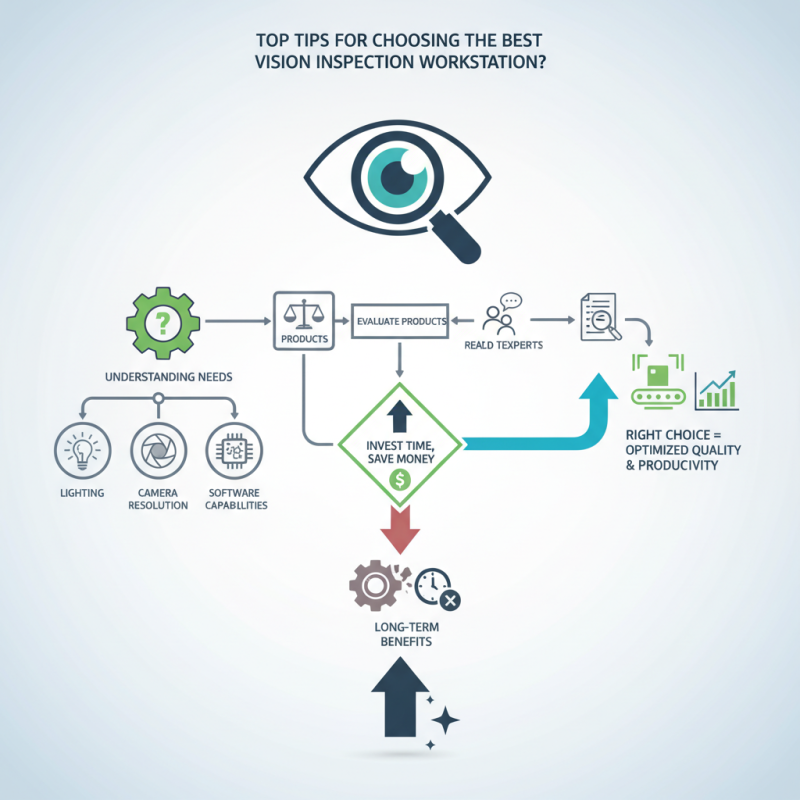
Understanding your specific needs is essential. Not every Vision Inspection Workstation fits all applications. Factors like lighting, camera resolution, and software capabilities are significant. Each detail affects inspection accuracy and workflow. A workstation that seems ideal may later prove insufficient.
Investing time in research can save money. Consult experts in the field and evaluate different products. Look for testimonials from real users. Their insights can reveal strengths and weaknesses not immediately visible. A Vision Inspection Workstation should enhance productivity, not hinder it. Taking the extra steps in choosing wisely pays off in the long run.
Understanding Vision Inspection Workstation Specifications
When selecting a vision inspection workstation, understanding specifications is vital. The right setup ensures quality control. According to industry reports, 70% of manufacturing defects can be traced back to inadequate inspection processes. This highlights the importance of choosing the right specifications for your workstation.
Resolution is a key specification to consider. High-resolution cameras detect small defects, which can be crucial in industries like electronics or pharmaceuticals. For example, a resolution of at least 3 megapixels is recommended for precise inspections. Furthermore, lighting system choices can greatly affect inspection accuracy. Variability in lighting can lead to false positives or negatives. Thus, adjustable LED lighting can help mitigate this issue.
Another aspect to consider is software compatibility. With rapid advancements in inspection technology, integration with existing systems is essential. A report from an industry expert revealed that 30% of users faced compatibility issues, causing delays and inefficiencies. However, rigorous testing and research can alleviate these concerns. Evaluating user feedback is also invaluable for selecting a reliable system that meets operational needs.
Evaluating Camera Quality and Resolution for Inspections
When selecting a vision inspection workstation, camera quality is crucial. High-resolution cameras significantly enhance accuracy and detail. Studies show that cameras with a resolution of 2MP or higher can capture intricate features effectively. This resolution is essential for industries like electronics, where minute defects can lead to failures. A detailed inspection helps in maintaining quality standards.
Consider the camera's frame rate. A higher frame rate results in smoother image capture, enabling the detection of fast-moving objects. A report from the Automation Industry Association indicates that a frame rate of at least 30 fps is ideal for dynamic inspections. It provides better real-time analysis and improves decision-making processes. An investment in robust camera technology pays off in the long run.
Tips for evaluating camera quality include checking sensor size and lens type. A larger sensor captures more light, improving performance in low-light conditions. Also, consider the lens's field of view. It must accommodate the inspection area without sacrificing detail. Sometimes, it may be tempting to compromise on camera specifications, but this can lead to missed defects and increased overall costs. Reflecting on the inspection process can guide better choices.
Selecting the Right Lighting Solutions for Optimal Visibility
Choosing the right lighting solutions is crucial for ensuring optimal visibility in vision inspection workstations. A well-lit environment can significantly enhance the accuracy of inspections. According to industry reports, over 70% of inspection errors are attributed to inadequate lighting. Selecting the correct light source can help minimize these issues.
LED lighting, for instance, is popular due to its energy efficiency and longevity. It produces a bright, consistent light that can effectively illuminate fine details. However, it’s worth noting that not all LED fixtures perform equally. Some may produce unwanted shadows or glare, impacting visibility. Regular assessments of lighting quality can help identify and rectify these issues.
Moreover, the color temperature of lighting plays an integral role. A temperature range of 4000K to 5000K works best for inspecting various materials. This range provides a balanced view without causing eye strain.
Implementing adjustable lighting solutions allows for flexibility based on the task at hand. In some cases, a combination of diffused and focused lighting can yield better results. These adjustments require ongoing evaluation to ensure effectiveness.
Assessing Software Capabilities for Image Processing and Analysis
When choosing a vision inspection workstation, the software capabilities for image processing and analysis are crucial. A powerful imaging software should deliver sharp, high-resolution images. This allows for precise inspections, reducing the risk of errors. Look for features that support advanced algorithms for pattern recognition and defect detection. These capabilities can significantly enhance the accuracy and efficiency of your inspections.
Consider user interface design. A complicated interface can lead to mistakes and slow down the inspection process. User-friendly software helps operators in training and real-time analysis. Providing tools to customize workflows can also adapt to different inspection needs. This flexibility is important as it accommodates varied applications, making the workstation more versatile.
Evaluate how well the software integrates with existing systems. This is often overlooked but essential for seamless operations. Poor integration can result in data silos and inefficiencies. Look for software that allows for data sharing and connectivity with other machines. This adaptability fosters a more streamlined inspection process, ultimately enhancing productivity. Making informed choices in software selection will elevate the performance of your vision inspection workstation.
Considering Ergonomic and Workflow Features in Workstation Design
When selecting a vision inspection workstation, ergonomic design is a crucial factor. Operators spend hours analyzing products. A poorly designed workstation can lead to discomfort or fatigue. Adjustable seating and work surfaces accommodate various user heights. This flexibility improves comfort and promotes productivity.
Workflow features also impact the effectiveness of a workstation. Efficient layouts minimize unnecessary movements. For instance, placing tools and materials within arm's reach reduces strain. Design considerations should also include lighting. Proper illumination is essential for precise inspections. Natural light is great, but task lights can enhance visibility.
Considering the layout can reveal hidden inefficiencies. Are inspectors constantly reaching for items across the workstation? Observing daily operations can signal areas for improvement. Collecting feedback from users is valuable. They understand the practical challenges that arise during inspections. Engaging them in the design process makes the workstation more effective and user-friendly.
Top Tips for Choosing the Best Vision Inspection Workstation
| Feature | Description | Importance |
| Adjustable Height | Allows operators to adjust the height for comfort and efficiency. | High |
| Lighting Options | Integrated lighting to reduce shadows and enhance visibility. | High |
| User Interface | Intuitive and easy to navigate controls for efficient operation. | Medium |
| Workspace Organization | Design that minimizes clutter and allows easy access to tools. | Medium |
| Durability | Constructed from high-quality, long-lasting materials. | High |
| Comfort Features | Features such as footrests and ergonomic seating options. | High |